- Strategic Advanced Recovery - FixData
- Posts
- How to detect a fake flash memory.
How to detect a fake flash memory.
Edition #8 by FixData

Alberto Navarro
December 20, 2023

Thank you for being a part of the FixData community! In this issue, you will find various topics about monolithics, as well as our premium content.

A counterfeit flash card is the same as counterfeiting any other type of item: it looks like something else, not what it really is. This is usually done to artificially add some additional value. For example, a 64 GB card may be marked as 64 GB, but its capacity may be one less.
The card could actually be only 8 GB, but be marked as 64 GB, here the problem would be that only 8 GB can be stored and the rest will not be retained.
Each Micro SD card has two main parts: the controller and the raw flash chip. Although the flash chip has a specific amount of space, such as 8 GB, the microcontroller can be programmed to report a different amount of space.
This is how the microcontroller of a dummy card can report 64 GB, while the flash chip remains at its 8 GB capacity.
That is, the operating system, when verifying the amount of space on the storage unit, may show this as a 64 GB device. But the operating system does not measure or verify the amount of space, but only consults the microcontroller of the card about its capacity. If the microcontroller is programmed to report a larger amount, the operating system will display what the card chooses to report, but not what the actual amount of space is.
So, for example, if the user has a fake 64 GB card (but it is really only 8 GB), he will be able to use the 8 GB of space, but from then on any new information will overwrite the previous one.
Partition files (such as boot tables, MBR, FAT) are not affected and the partition still works correctly, but sometimes the driver rewrites these partition files based on user data.
How to detect fake Micro SD and SD cards
Sometimes vendors are aware that they are selling counterfeit memory, sometimes they don't even realize it. The purpose of this article is to try to correctly identify the card we have from a customer and to understand why we get only an 8 GB dump in the flash utility and not 64 GB.
Here are some criteria to recognize a fake card just by looking at the seller's pictures:
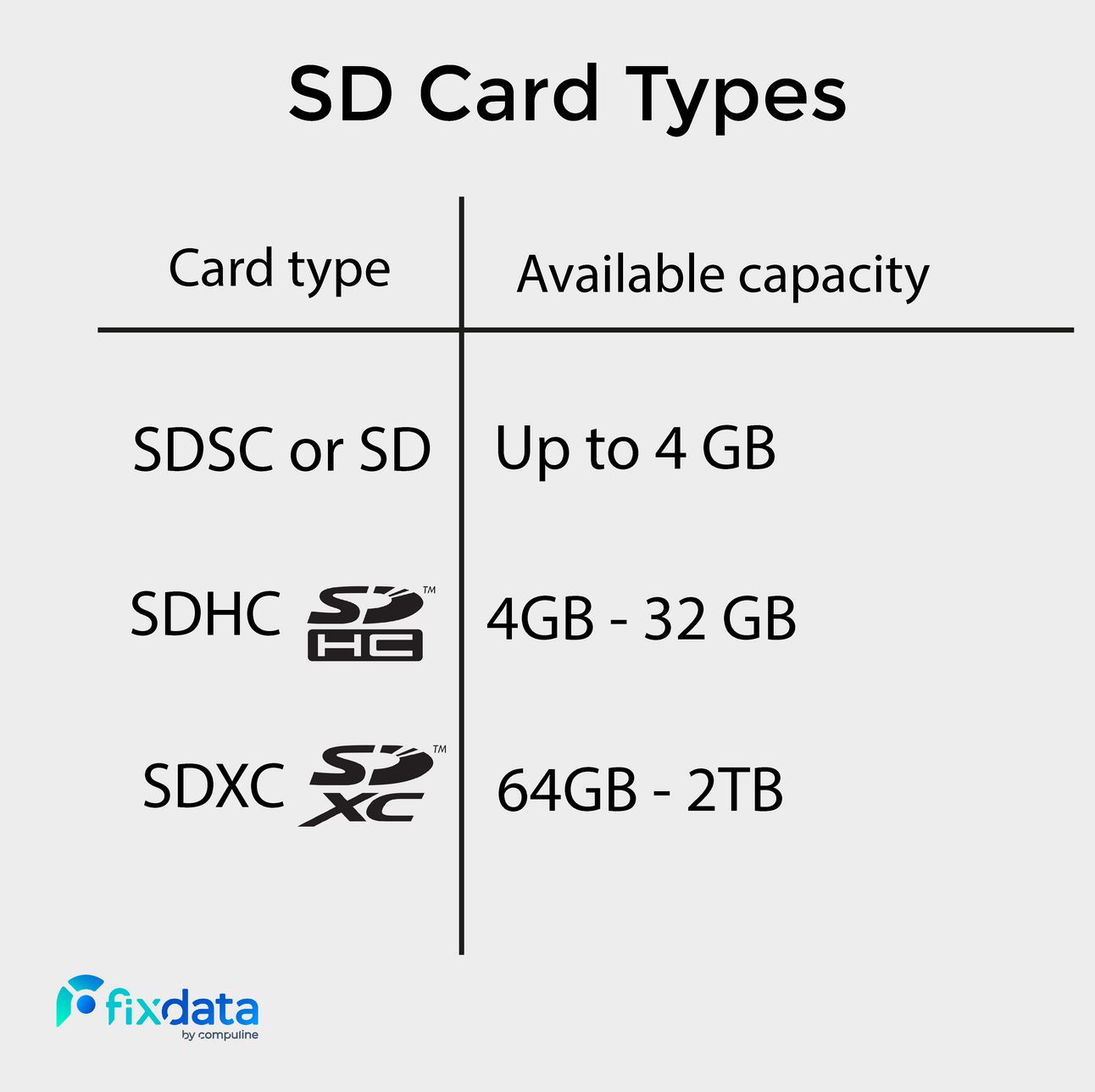
This means that to get 64 GB or more, the card must be an SDXC. If it is an SDHC or Micro SDHC and it is marked as 64 GB, we can assure you that it is 100% false because the labeling would be merely inconsistent.
Packaging
As mentioned above, if the card is 64 GB or larger but the packaging is marked "Micro SDHC" or "SDHC", then this would also be fake.
Counterfeit cards are usually poorly packaged and may even be missing some graphic elements compared to the original packaging. For example, all Samsung-like counterfeit cards never show the capacity on the case, while the originals do.
There are even occasions where the packaging does not match the card. The case may be marked "Sandisk Ultra", but the card inside has "Sandisk Extreme".

This is also false.
Another type of inconsistency is when the card packaging says "Class 10", but the card says "Class 6" or if the package says "MicroSDHC", but the card bears the "SDXC" logo or the other way around, these types of inconsistencies are found in counterfeit cards.
Card (front)
When checking a card for veracity, the first thing to do is to verify that the card family matches its capacity. For example, the SDXC logo should appear on all cards with a capacity of 64 GB or more.
Also, as an additional resource you can check the manufacturer's website to see what the card looks like. For example, there are a variety of 128GB Sandisk Micro SD cards in different colors than the original Sandisk location, as shown on the brand's website. You can also compare other visual aspects with the original image, such as font type or labeling alignment.
Card (back)
Most modern counterfeit cards have the following on the back:
MMB3R 08 BUACA-GE (part number).
XL8B20140105 (date code, may vary)
Made in Taiwan
The same part number is on all the counterfeit Micro SDs. You may even notice that the "08" part of the part number may be reference to the actual capacity of the card, i.e. 8GB.
Some variations may be:
MMB3R 08 GUACA-GE
MMB3D 08 GUACA-GE
MMB3D 08 GUACA-GE
MMB3R 08 GUACA-GE.
Memory card data sheet
If you cannot visually deduce if the card is a fake, you can try finding a datasheet of the card.
*The following will require the PC-300 Flash tool.
First, read the chip ID using the PC-3000 flash reader and try to find the datasheet document using the driver mark value.

Here we have a chip marked as K9GAG08UOM with 2 GB vole, but marked as 1 GB.
If you check the "Service information" window we have this view:

Few pages are filled with data, but others are filled with the pattern "FF". This means that this card is defective and was reprogrammed by the manufacturer.
Now try to find the data sheet for this chip, you need to use chip marking information, for this case it is K9GAG08U0M.

As you can see, this memory is actually a chip with 2 GB space.
Another example of this is when the "FF" pattern can be recognized with a large step value.

Here you can see the chip brand MT29F64G08CFAAA and if you check the "Service information" window with the step value "1024", we can see that the card has a user data lock and a "FF" pattern lock:

To solve this it is necessary to separate the real data and the "FF" pattern data, to do this you need to use the "Split by block" preparation and then the "Join by Dumps" step.
The following image shows the reverse side of fake cards: Sandisk, 2 x Samsung, ADATA and one Generic.

Can you guess which one belongs to which brand? Yes, all parts have the same part number on the back: MMB3R08BUACA-GE.
In reality, all of the cards in the image above are counterfeit. Note that occasionally counterfeit memory is sold at auctions (on sites such as AliExpress, eBay, etc.), if you find a listing for sale on the internet with a suspiciously low price compared to the price of official dealer offers, it is highly likely that they are fake cards.
Become part of the community, join our WhatsApp group!
Relive our webinar on what's new in storage devices, register in the following link, registration is free of charge.
Is the solid state drive (SSD) better?
 | The solid state drive (erroneously called solid state hard disk) or also known as SSD (Solid State Drive), is a very popular storage device because of its speed. Although it was a rather expensive device at the time, it... |
Follow us on Instagram

Which topic should we address in the next issue?
Send us an email and tell us, what theme would you like to see next?
Subscribe to Premium to read the rest.
Become a paying subscriber of Premium to get access to this post and other subscriber-only content.
Already a paying subscriber? Sign In.
A subscription gets you:
- • Access to advanced exclusive content
- • Exclusive deals for data recovery services
- • Discount cupon for our data recovery course
- • Special thanks mention every month