- Strategic Advanced Recovery - FixData
- Posts
- Is it normal for a hard drive to make strange sounds
Is it normal for a hard drive to make strange sounds
Edition #2 by Fixdata

Alberto Navarro
November 08, 2023

It’s time for more content about professional data recovery! Thanks for sticking around for this second edition… second edition! Wow, super thanks for being an early bird! We are working hard to make our content better each time, hope you enjoy.
In this second edition, we will cover:
What to do when an HDD makes strange sounds
Masterclass: “Data Recovery Trends”
The Anatomy of an HDD Hard Disk Drive
Can corrupt files be restored?
Top 7 myths about the hard disk drive
Graphic designers' work recovered!
What to do when an HDD makes strange sounds
It is completely normal for a hard disk drive to make certain noises, after all, it’s a device that has parts moving at very high velocities. But there are some abnormal sounds that can help us identify if something is wrong.
First, let’s talk about the regular sounds that you should be hearing from time to time.
The rapid spinning of the disks can make a gentle buzz sound. This sound can be very faint or a little louder depending on the surrounding environment. For example, in a large empty room it could be louder or if the disk is placed on a surface of certain materials.
During shutdown, the disk’s arms will go back into its stand by position. When this happens, sometimes you might hear a click sound. (This is only normal when performing a proper shutdown or turning sleep mode on. If the computer is turned off unexpectedly, the arms will bounce to their stand by position, which can cause severe damage to the read/write heads.)
When it comes to a RAID unit, the noise will be louder due to the number of hard drives in use.
It is important not to confuse the sound of other components like fans or the power supply unit if the hard drive is internal. In case of an external hard drive, the sounds should be a lot easier to identify.
The sounds that we should be looking out for and that should be raising concern are the ones that appear when you are not making a bulk use of the device. For instance, if you are currently not writing any new files, then there shouldn't be much noise coming from the hard disk drive. Other sounds that are not normal for a healthy HDD are:
Screeching sounds can be heard if there is severe physical damage. Usually this means that the heads are crashing against the disks, this can cause scratches on the surface of the plates. It is important that you stop using the device immediately if you hear screeching sounds and contact a data recovery professional.
Exaggerated buzzing sounds or intense vibrations are also considered abnormal (remember, this will depend on the environment).
Rattling or any other noise that sounds like a loose part. Especially when the device is turned off and the arms go to their stand-by position, if there is a rattling or loud screeching sound there could be severe physical damage.
Rhythmic tapping sound. Usually this sound happens when the hard drive is already malfunctioning, i.e. it doesn’t boot. In this case, the data should be backed up by professional equipment and transferred to a new storage device.
Beeping sounds, when trying to boot the system if it fails along with a beeping sound there could be a problem with the hard disk drive. Although these devices don’t have speakers of any kind, if you hear a beeping sound, it’s probably coming from the motherboard or the system speakers.


In conclusion, what should you do if you hear any strange sounds coming from the HDD?
First, make sure that the sound is in effect coming from the hard drive. There are several parts in a computer or storage system that make noises, some louder than others. Fans are the noisiest components of all.
Check if there is something in the environment that could be causing a strange sound. For example, the surface that the device is on, or if there are any objects near the HDD that could be receiving the vibrations it makes.
Check if all the components of the computer or storage system are in place properly. Sometimes screws can get loose on their own and my cause strange sounds do to the vibrations of other moving parts.
Make sure that the power unit is working properly and if it’s making any sound. Power units will typically make a faint buzzing sound, but they could be causing more noises depending on their condition.
If you suspect that the hard drive is damaged or if there are signs of failures, shut down the system immediately and stop using the device. Take the device to a professional data recovery center and get professional advice, otherwise you may put your data in danger of permanent lose.
Become a part of the community, join our WhatsApp group!
(Spanish speaking community)
Masterclass: “Data Recovery Trends (Spanish Spoken)”
*Interested in receiving this masterclass in English? Let use know by replying to this email!
The Anatomy of an HDD Hard Disk Drive: Internal Components and Operation

Mechanical hard disks, also known as HDDs (Hard Disk Drives), are mainstays in the world of computing, playing a pivotal role in data storage. These drives, present in personal computers and enterprise servers, house an intriguing set of internal components that enable their operation. In this article, we will dive into the world of HDDs, exploring their essential components and inner workings.
Key Components in the Head Assembly
Air Filter: The air filter plays an essential role in keeping the internal environment free of particles that can damage the delicate components. This ensures reliable and long-lasting operation of the hard drive.
Reader Head Ramp: On some HDD models, there is a ramp that allows the reader heads to be parked on the platters. This is an important detail that affects the life and performance of the device.
Actuating Shaft and Actuating Arm: The actuating shaft is responsible for moving the actuating arm, which supports the read heads. These heads are critical, as they are responsible for reading and writing the information on the hard disk platters.
Coil: The coil is a crucial component of the actuator arm, generating the electrical pulses necessary for arm movement. In addition, it has a unique ability to store energy that can be used to move the arm in the event of a sudden power failure, protecting the data and the disk.
Magnetic Platters
Magnetic platters, circular magnetic disks, are the heart of a hard disk. These platters store digital data and are manufactured from aluminum, glass, or ceramic substrates, depending on the type of disk. Laptop hard drives typically employ glass platters, while desktop drives prefer aluminum platters.
Each platter has the capacity to store information on both sides, requiring two recording heads per platter, one for each surface. The manufacturing of the platters involves the deposition of a thin layer, mainly by a vacuum deposition process called "magnetron sputtering". This layer contains various metal alloys and a protective layer of carbon.
A Sea of Bits: Magnetic Regions
The magnetic surface of each plate is divided into small magnetic regions, each representing a binary unit of information. These regions have sub-micrometer dimensions, with a width of 200 to 250 nanometers in the radial direction and 25 to 30 nanometers in the downward direction. This equates to an impressive density of 100 billion bits per square inch.
The Electric Motor: Initiating the Rotation
Inside the hard disk, we find a brushless electric motor, which is responsible for initiating the rotation of the platters at a certain speed, measured in revolutions per minute. This motor is essential for the overall operation of the hard disk, as it allows access to the data stored on the platters.
In short, HDDs are complex engineering marvels. Their internal components, from the protective casing to the magnetic platters and read heads, work in harmony to reliably store and access your data. Understanding the anatomy of these traditional devices is essential to appreciating their importance in the world of computing.
NEWS: PREMIUM CONTENT COMING SOON!
On the next edition (Edition #3) of Strategic Advanced Recovery, we will be including premium content right here inside this very newsletter. We want to share more detailed information about recovery cases, step by step and useful cases that can help you learn more about professional data recovery process.
If you want to subscribe to the premium tier, you can do so at the end of this page. ⬇️⬇️⬇️
Can corrupt files be restored?
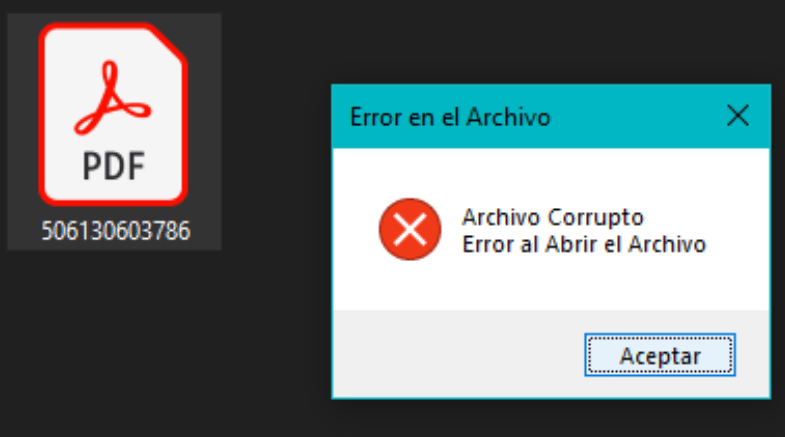 | Se le conoce como archivos corruptos o dañados a los documentos que sufren de algún fallo que impide el acceso a la información que almacena dicho archivo… |
Top 7 myths about the hard disk drive
 | …pero no todo es tal cual se rumora, por esto es que vamos a desmentir algunos mitos populares acerca del disco duro (HDD)… |
Graphic designers' work recovered!
Talking about strange sounds coming from an HDD, this week's success story is about a Seagate external drive from a graphic design company. Omar came in with this case, all the company’s recent work was inside the drive, which not only started to make unusual noises, but wouldn’t let him access any data.
We received the HDD and started to work on it immediately, since the client wouldn’t be able to continue his work without his files. Severe physical damage was detected, as imagined do to the specific symptom of the noises it was making.
We had to exchange parts, and after working very hard and keeping a very close eye on the progress, the case ended with a 95% success rate! That's right, our data recovery experts were able to retrieve 95% of the data from this damaged hard drive.
Another satisfied customer, thank you Omar for trusting us and for your preference.
What topic would you like to read in the next edition?
Email us and tell us, what topic would you like to see next?
Subscribe to Premium to read the rest.
Become a paying subscriber of Premium to get access to this post and other subscriber-only content.
Already a paying subscriber? Sign In.
A subscription gets you:
- • Access to advanced exclusive content
- • Exclusive deals for data recovery services
- • Discount cupon for our data recovery course
- • Special thanks mention every month