- Strategic Advanced Recovery - FixData
- Posts
- Special Edition: Spider Board and PC-3000 flash
Special Edition: Spider Board and PC-3000 flash
Edition #3 by FixData

Alberto Navarro
November 15, 2023

Thanks for being a part of the FixData community! This is a special edition because it’s the first time we include premium content! You will also find:
What is Disk imaging?
HITACHI HDD Platter Swap
Data recovery tools: Spider Board
More content from our blog (in spanish)
Premium Content: Data recovery from a SD card of 16 GB and 200 GB with Spider Board and PC-3000 flash
Deals on data recovery services
What is Disk Imaging?

A disk image is a complete copy of all the files stored on the computer and is used when the internal hard disk is damaged and the information needs to be transferred to a new one.
They are also used when upgrading the computer for backup purposes. In case of computer failure, a backup image can be used to recover your computer system or find and restore any necessary files from within an image.
In most cases, standalone disk imaging platforms also include other functions related to drive management.
Acronis Cyber Protect
It also operates as a versatile solution for disk backup and duplication. Cyber Protect provides users with the ability to schedule both full and incremental backups.
Clonezilla
This is a completely free open source disk solution that supports a variety of file system formats, and provides imaging and cloning capabilities. The server versions of this software are ideal for large-scale deployments, allowing simultaneous cloning of multiple computers.
Macrio Mirroring
Works as a backup, imaging and cloning solution for Windows.
Disk imaging is a secure way to restore a computer's files (as well as applications and the operating system).
Vídeo: HITACHI HDD Platter Hot Swap
Vídeo language in spanish, for english use YouTubes CC subtitles and choose English in settings.
Become a part of the community, join our WhatsApp group!
(Spanish speaking community)
Data recovery tools: Spider Board
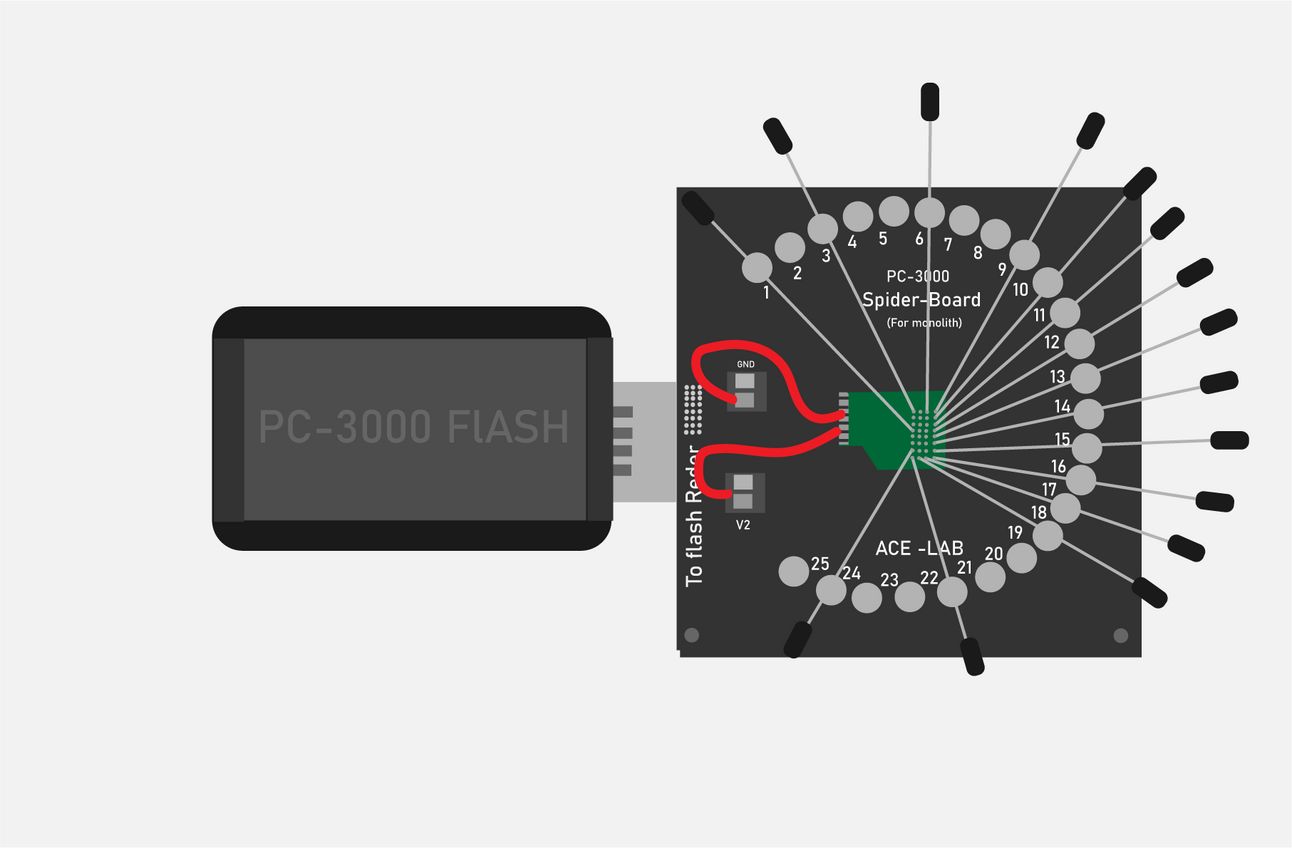
Data recovery on monolithic chips presents one of the most complex challenges for data recovery professionals. One of the main obstacles these engineers face lies in the internal structure of the memory chips. These chips are coated with a layer of black plastic, under which is a NAND crystal with small traces connected to the PCB.
The process of removing this coating is highly risky, as there is a possibility of damaging the NAND core during this procedure. Fortunately, with today's technological advances, tools have emerged that are capable of recovering information from various storage units.
Among these innovations is the Spider Board tool, which represents one of the latest advances in the field of information retrieval. Its design and architecture are specially conceived to establish connections with the internal contacts of NAND-based Flash drives, which are manufactured as individual chips (monoliths).
The Spider Board adapter consists of 25 universal contacts that can be configured via software to associate with the corresponding NAND interface signals. It is important to note that the Spider Board is only compatible with the PC-Flash Reader 4.0, which ensures effective synchronization.
This adapter consists of a printed circuit board (PCB) to be connected to the extension connector of the PC-Flash Reader 4.0 device. The central area of the board is intended for chip placement and is surrounded by 25 needle-shaped pins that precisely contact the outputs of the monolith. In addition, it has two screw terminals connected to the GND and V2 power lines.
The Spider Board is a highly intelligent hardware configuration based on a configurable and complete Xilinx microchip. It is a versatile system with a wide range of functions that is constantly being upgraded to improve its performance.
By using this adapter, it is possible to retrieve data from a wide variety of monolithic devices. In addition, it offers the option to work in card adapter mode with devices such as mSD, SD and eMMC, which further extends its usefulness and versatility in the field of data recovery.
¿Cómo funciona un disco duro HDD?
 | Es un dispositivo de almacenamiento de datos, los discos duros son considerados no volátiles (NVS), esto quiere decir que no necesitan de una fuente de… |
Tipos de fallas en discos duros
 | En los discos mecánicos (HDD) que por su costo y almacenamiento son los más utilizados, estos discos pueden presentar estos tipos de fallas… |
Reviews from our clients

What topic would you like to read in the next edition?
Email us and tell us, what topic would you like to see next?
Subscribe to Premium to read the rest.
Become a paying subscriber of Premium to get access to this post and other subscriber-only content.
Already a paying subscriber? Sign In.
A subscription gets you:
- • Access to advanced exclusive content
- • Exclusive deals for data recovery services
- • Discount cupon for our data recovery course
- • Special thanks mention every month