- Strategic Advanced Recovery - FixData
- Posts
- Special edition: What are headers on an HDD?
Special edition: What are headers on an HDD?
Edition #04 by Fixdata

Alberto Navarro
November 22, 2023


In this edition, we will cover:
Top 4 reasons why an HDD should never be opened
What are headers on an HDD?
Video: Hot Swap
How to safely backup your data
Recovering data from a SSD
Photographer’s work saved!
PREMIUM CONTENT:
Top 4 reasons why an HDD should never be opened in a regular environment
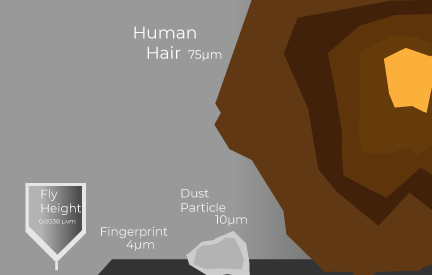
When it comes to opening an HDD, there is only one right way to do it and that is with professional tools, a clean environment and of course, experience. The most common mistake according to the cases we attend in our labs is when the hard disk has been opened in a regular environment.
By regular environment, we mean any place that has no air filtering. In other words, the only safe place to open a hard disk would be in a clean room. A clean room is a space especially designed to keep low levels of contamination. It must follow specific criteria such as controlled environmental parameters, controlled levels of particles in the air, temperature, humidity, air pressure, lighting, etc.
1. Avoiding dust particles
In the case of a data recovery lab, it should have its own clean room to work on cases where the HDD needs to be opined and exposed to air. A clean room will prevent contamination on the disk. If particles of dust get stuck on the plates, they could cause scratching on the surface, which would eventually lead to data lose.
2. Avoiding hairs
Yes, hair just as dust could cause severe damage to a hard disk if a strand were to end up inside the device. Data recovery experts use hair nets when working inside the clean room to avoid loose hair from falling in the work area.
3. Avoiding humidity
Just like using hair nets, another measure taken by experts is the use of masks. When working in the clean room you must wear a hair net, coat, shoe covers and a mask that will prevent the humidity of your breathing to contaminate the drive. This is due to the fact that when working with an open HDD, you will probably be getting really close to the device in order to be able to see the small parts and other observations.
4. Avoiding fingerprints
Another incident that often happens when opening a hard disk at home is accidentally touching the platters. Many times it may even go completely unnoticed until taking a closer look and finding a fingerprint or two on the surface of the platter. This can cause issues just as any other form of contamination (check illustration above). It is crucial to wear gloves when working with opened hard drives.
In summary, a hard disk drive should never be opened in a regular environment. There are special requirements that need to take place and must be performed by a professional with experience in the matter.
Become a part of the community, join our WhatsApp group!
(Spanish speaking community)
What are the “heads” on an HDD?
Mechanical hard drives are one of the most widely used storage units in different devices, for saving information, with different types of hard disk drives that have a specific performance depending on the use which they are intended for.
An HDD, has different types of components which help make its operation optimal, one of the most important components in the entire architecture of a mechanical hard drives is the magnetic head or also known as heads.
Its main function is to read and write all the data that arrives to the HDD, recording or extracting the information that is stored in the sectors of the magnetic platters of the hard disk. That is why the heads are one of the most important components within the structure of mechanical hard disks.
Part of the structure that composes the magnetic head are several microcomponents which help to record or read the information by means of magnetism in the sectors of the platters. Some of the components of the magnetic head are:
Cable or bus: The data bus helps us to make a connection between the PCB of the HDD and the actuator arm, which is responsible for making the necessary movements so that the heads can be positioned in the appropriate sectors to record or extract the stored information.
The bus has as main function to be a bridge to provide energy, which is used to move the actuator arm, as well as to perform the transfer of information that comes from the HDD interface and goes in the direction of the platters and conversely, from the platters to the outside of the hard disk.
Preamp chip: The preamp helps to supply the necessary power to the head to be able to do the writing process to the platters. In addition to the preamp helps while the information reading process is being performed, the preamplifier amplifies the captured signal so that it can reach the PCB directly and in this way the stored information can be used.
Slider and head: They are in charge of reading and writing the information on the magnetic surface of the hard disk platters. They are of a small size and are kept at a certain height so as not to touch the hard disk platters, since if this were to happen the information could not be read or written and the platter would be scratched.
This is how the architecture of the heads is structured and how together all these components help the information to be read and written on the hard disk platters.
Video: Hot Swap
How to safely backup your data
 | Hoy en día existen diferentes maneras de respaldar tu información, contamos con dispositivos físicos y también contamos con los servicios en la nube… |
Recovering data from a SSD
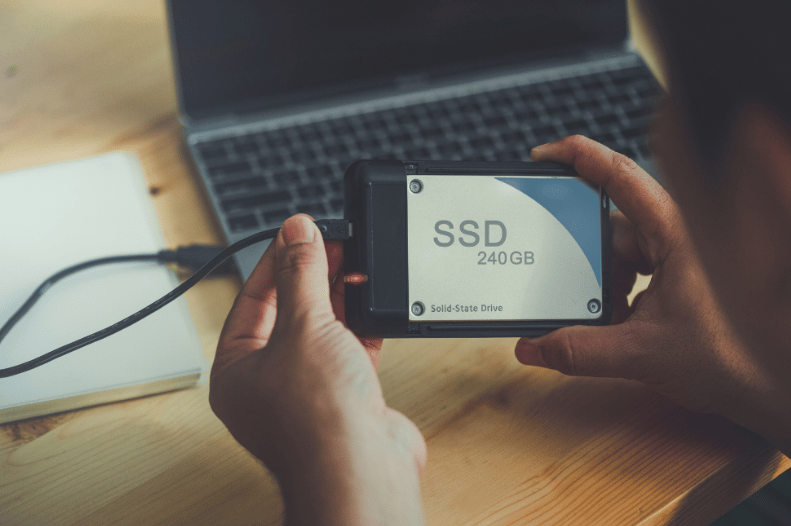 | A comparación de los HDD los SSD, la manera de recuperar los datos es diferente, ya que los componentes y el funcionamiento interno es completamente distinto… |
Photographer’s work saved!
This time in our client stories, we have David’s case. David is a professional photographer, he works with big projects that not only have a great monetary value, but he also captures moments that can’t be repeated.
When David started backing up his files, he noticed something was wrong. After trying to open some of the photos, he came to the surprise that they could not be opened. The files seem to be damaged. We were happy to help and thanks to David’s trust, cooperation and patience we were able to recover 95% of his data.
In this case, we worked on physical damage, meaning we had to exchange parts from a donor disk. Whenever these type of operations need to take place we ask our clients, in this case David, if they agree to proceed (since it does require an investment). So after having David’s expressed agreement, we took action in finding a donor and started working on the case within our facilities that include a clean room where we can open the disks properly.
Finally, after many hours of dedication, we were able to save David’s hard work and helped him get back on trap with his projects.
What topic would you like to read in the next edition?
Email us and tell us, what topic would you like to see next?
Subscribe to Premium to read the rest.
Become a paying subscriber of Premium to get access to this post and other subscriber-only content.
Already a paying subscriber? Sign In.
A subscription gets you:
- • Access to advanced exclusive content
- • Exclusive deals for data recovery services
- • Discount cupon for our data recovery course
- • Special thanks mention every month