- Strategic Advanced Recovery - FixData
- Posts
- Data recovery from a SSD (Solid State Drive)
Data recovery from a SSD (Solid State Drive)
Edition #5 by Fixdata

Alberto Navarro
November 29, 2023

Thanks for being a part of the FixData community! In this edition, we will cover:
Anatomy of an SSD
Types of SSD and their memory
Video: SSD Data Recovery
What is SSD, and what is it for?
Advantages and disadvantages of SSDs
PREMIUM CONTENT: Data recovery process from an SSD
Anatomy of an SSD

Solid State Drives (SSD) are a type of information storage devices, with a different structure, design and architecture than mechanical hard disks HDD.
SSDs are designed to provide a higher speed when reading or writing data to the memory chips, in addition to providing a more compact design with a lighter weight than a mechanical hard disk HDD.
Compared to HDD the SSD has a smaller number of components that make it up, they are as follows:
Memory chips:
SSDs use NAND, a type of flash memory which is used to store information in cells.
This offers a higher speed when writing or reading information and increases the performance of the equipment.
Inside the memory chips is floating gate transistor technology, done there are different ways in which information is stored inside the memory cells such as SLC, MLC, TLC and QLC.
Interface:
The interface is the slot that will make the connection of the SSD unit with the equipment where it will be placed, as well as in the HDD the SSD has interfaces which help to generate a connection between the equipment and the storage unit. The solid state drives handle interfaces such as SATA, which is a widely used interface in HDD, which makes it easy to make an upgrade of the storage unit in the equipment.
Other SSD interfaces are M.2 and NVMe PCIe.
This provides an increase in data transfer speed and better performance.
With the NVMe communication protocol, the communication between the computer and the storage unit is optimized, as it uses 4 lanes per device to perform the information transfer and can transmit up to 1000 MB/s per lane using the PCIe interface.
Buffer:
This component is an SDRAM chip, which helps us to generate a higher speed in the communication between the drive interface and the controller.
But not all SSD drives have this component on their PCB.
Controller:
The controller is the core of solid state drives, it is the component in charge of deciding how fast the drive is. In some SSDs, the controller is in charge of organizing the layout of the NAND chips for information storage.
In some controllers, data compression is used, which increases the performance of the drive. With data compression, fewer data is transferred and thus drive performance is optimized.
SSD Types and Memory

The SSD (Solid State Drive) is a type of storage unit designed to provide a higher speed when reading or writing information inside the flash memory, in addition to providing a more compact design with a lighter weight than an HDD.
Solid state drives can be found with different interface formats such as:
SATA interface:
SATA (Serial Advanced Technology Attachment) interface is currently the most widely used, as HDDs mostly have this type of interface.
With this type of connection, transfer speeds of up to 600 MB/s can be achieved, and its size is suitable for most laptops and PCs.
This type of interface is one of the slowest in SSD models when reading and writing information, but it is still 5 times faster than mechanical disks (HDD).
NVMe interface:
Non-Volatile Memory Express (NVMe), is a new protocol implemented in flash memories, which is in charge of data transport and data storage access. This results in shorter response times and higher performance.
This type of interface uses the PCI Express bus, which is a factor in the read and write speed that this type of SSD can handle.
M.2 interface:
This type of interface makes the SSD reach a higher read and write speed than the other interfaces, over 2600 MB/s.
This type of SSD is designed to be implemented in equipment, light computers, such as laptops, notebooks, ultrabooks, etc.
M.2 are based on SATA or NVMe. If we talk about the SATA based interface, it is an m-shaped bus, while the NVMe based interface features a PCIe bus.
Flash memory:
The storage with which the SSD counts are known as flash memory chip, within these chips we find the floating gate transistor technology, which over the years has evolved considerably, advancing to be able to store more bits in the memory cells.
Types of memories that have been structured and incorporated in SSDs:
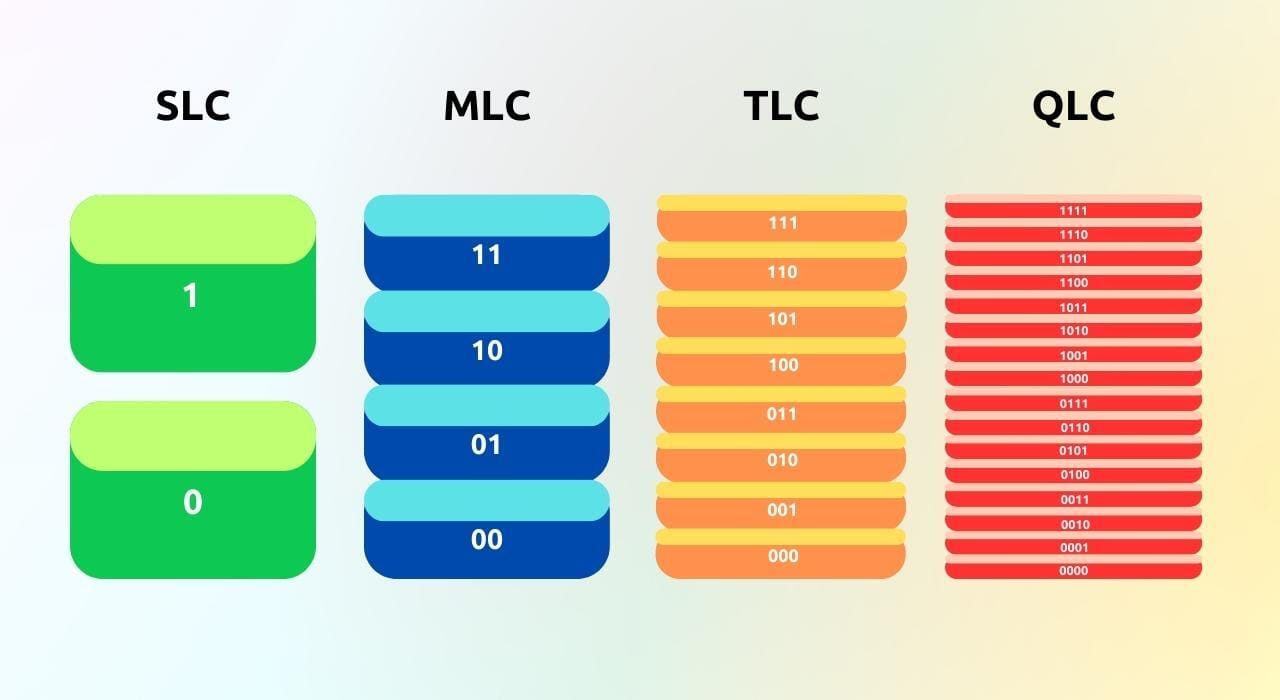
Single Level Cell (SLC)
The architecture of this type of chip is based on individual silicon slices, resulting in a thin chip with the capacity to store one bit of data in each memory cell.
Among the advantages are faster access speed, longer lifetime and lower power consumption. All this is achieved thanks to the lower data density, although the manufacturing cost is much higher and the storage capacity is lower.
Multi-level cell (MLC)
These types of chips are less reliable and faster than the previous ones, but in exchange they allow the creation of higher capacity chips at a lower cost.
To manufacture them, several silicon sheet molds are used for each chip. This makes it possible to store two bits per memory cell (some manufacturers have managed to store 3 bits). Because of this, the read/write rate is lower, although it is still far superior to that obtained with mechanical hard disks.
Triple Level Cell (TLC)
TLC chips allow up to 3 bits to be stored in each memory cell and are currently the most widely used commercially due to the low cost of producing them.
One of the most negative points of this type of SSD is that it is limited to a lifetime of about 1000 writes, although this figure expressed in time will always depend on the use you make of the computer or device where it is installed.
Quad Level Cell (QLC)
In this case, each cell is capable of storing up to 4 bits, which reduces the price of manufacturing this type of unit. In particular, QLC technology only allows a write/erase limit of about 100 times, which makes its lifetime very, very short. It can be an option for storage units when saving static files, since there is no read access limit.
Video: Data Recovery for SSD
Vídeo language in spanish, for english use YouTubes CC subtitles and choose English in settings.
Become a part of the community, join our WhatsApp group!
(Spanish speaking community)
What is SSD, and what is it good for?
 | Las unidades de estado sólido o también conocidas como SSD por sus siglas en inglés Solid State Disk. Son una mejora innovadora en los componentes de almacenamiento… |
Pros and cons of SSD
 | En comparación al disco duro mecánico (HDD), el SSD nos trae muchas mejoras y ventajas. Claro está que ningún componente es realmente perfecto, las SSD tienen algunas desventajas… |
What topic would you like to read in the next edition?
Email us and tell us, what topic would you like to see next?
Reviews from our clients

Subscribe to Premium to read the rest.
Become a paying subscriber of Premium to get access to this post and other subscriber-only content.
Already a paying subscriber? Sign In.
A subscription gets you:
- • Access to advanced exclusive content
- • Exclusive deals for data recovery services
- • Discount cupon for our data recovery course
- • Special thanks mention every month